Import Scripts
When importing documents, scripts can be integrated at various points in time. These scripts – Java Script or VBScript – are run during import.
The following scripts are available for import:
- Record scripts: after an imported record
- Object type scripts: before importing the data of an object type
- Field scripts: before each import of a field value from the import file
Further information on scripting can be found in the developer documentation.
The scripts are created in the script editor. To do so, you can upload an existing script or paste it from the clipboard into the script editor for editing.
For object type scripts as well as for field scripts, a minimum script, which can be extended at any time to suit the specific project, is preset as the default.
If you delete the script content and click Restore, the sample script will be uploaded again in the selected script language.
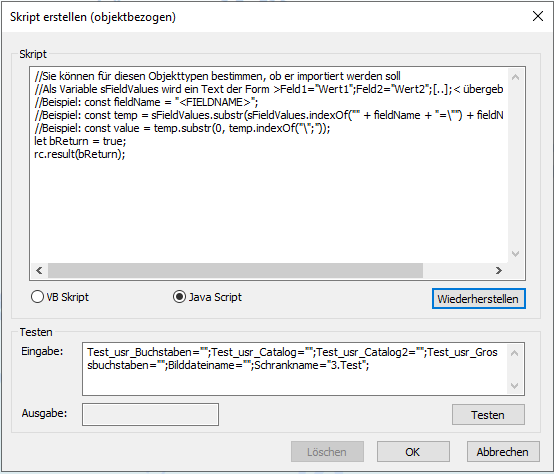
You can use object type scripts to decide whether the current object should be imported into the system. Field scripts allow you to modify the field data directly.
Debugging Scripts in Document Import
JavaScript in the document import can be debugged in the same way as JavaScript in the document export: JavaScript in the 'Run script' automatic action and JavaScript in the 'Run SQL command' automatic action via the configuration dialog for automatic actions.
Debugging is not available when executing automatic actions from enaio® start. The scripts are only run there.
When executing the import via the configuration dialog for automatic actions, only the record scripts are automatically suspended in the debugger. The ...with debugger mode can be selected for configuration and startup. In the Configure with debugger mode, the object type scripts and the field scripts are automatically suspended in the debugger when the script is tested. In the Start with debugger mode, only the record scripts are suspended automatically.
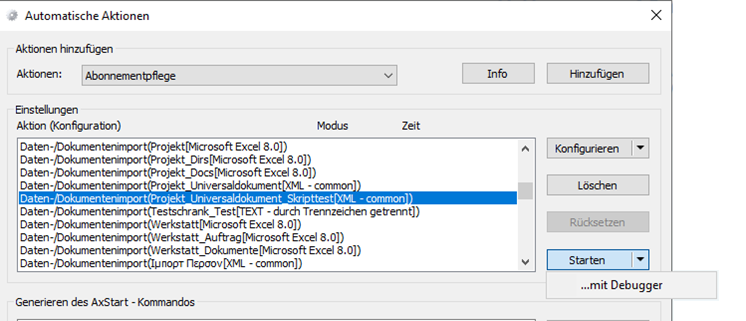
Further information on debugging can be found in the developer documentation.
VB script
The following global data is available in the various VBScript types:
Field Scripts
Variable: sOrgValue
Data type: String
Function:
Current field value from the import file that can be modified and returned in this script.
Return value: rc.result(string)
Data type: String
Function:
Field value that is modified by the script and returned as field content for the current object.
Object Type Scripts
Variable: sFieldValues
Data type: String
Function:
List of field values from the import file.
The list uses the structure: Feld1="Wert1";Feld2="Wert2";...;
These field values can be used in the script to decide whether to create an object of this type.
Return value: rc.result(boolean)
Data type: Boolean
Function:
The return value specifies whether the current object of this object type should be created during the import or whether this object type should be omitted from the import run.
Record Scripts
Variable: arrObject
Data type: Array
Function:
Informs about all DMS objects affected by this record. The number of elements in the array is defined by the number of previously selected DMS objects. In this manner, the first array element indicates information on folder processing (usually, if the object processing order was not changed), and the second on register details (if registers are used).
Each array entry corresponds to an import objects and looks as follows:
<OrdnerTyp>#<OrdnerID>/<RegisterTyp>#<RegisterID>/<ObjektTyp>#<ObjektID>:<Aktion>
The action can contain these values:
0=no action, 1=update, 2=insert, 3=delete, 4=error
Examples:
Example 1: folder: 1#123/0#0/1#123:1
Example 2: register: 1#123/6488065#20/6488065#20:2
Example 3: document in register: 1#123/6488065#20/65537#1024:2
Example 4: document directly in folder: 1#123/0#0/65537#1024:2
Example 5: Document in workflow tray: 0#0/0#0/65537#1024:2
Example 6: Typeless document in workflow tray: 0#0/0#0/19660800#1024:2
The array with the above example details receives the following values if an imported record includes a folder, register, and document:
arrObjects(0) = 1#123/0#-1/1#123:1
arrObjects(1) = 1#123/6488065#20/6488065#20:2
arrObjects(2) = 1#123/6488065#20/65537#1024:2
Variable: strFieldValues
Data type: String
Function:
String with all fields imported in this record.
Field values of the record, format:
<Feld1Name>="<Feld1Wert>";<Feld2Name>="<Feld2Wert";<…>;
Example:
ProjectNo="1234";responsible="James Smith";image file="c:\import\file1.tif";
If a field value includes the double quote, a second double quote will be added to it in front.
Variable: RecordsetError.RecordInvalid
Data type: Boolean
Function:
The return value controls whether a record should be considered as successful or corrupt (default: FALSE)
Example for a Record Script:
This example of a script sets an imported document as 'archivable'.
const  server=new rc.com.ActiveXObject("OxSvrSpt.server");
const session = server.Login("<login>", "<password>", "<ip-address>", "4000", pwNotEncrypted)
let x = strFieldValues;
let  sFullObjectActionInfo,  sFullObjectInfo , sObjectInfo;
let vArray, sAction;
let  sObjectType, sObjectID;

//Alle Objekte durchsuchen
for( let i=0; i< arrObjects.length; i++)
{

   sFullObjectActionInfo = arrObjects[i];

  //Action trennen
   vArray=sFullObjectActionInfo.split(":");
   sFullObjectInfo = vArray[0];
   sAction = vArray[1];

   // Dokument trennen
   vArray=sFullObjectInfo.split( "/");
   sObjectInfo = vArray[2];

   // Object ID und Typ trennen;
   vArray=sObjectInfo.split("#");
   sObjectType = vArray[0];
   sObjectID = vArray[1];

  //Testen auf Objekttyp
  if( sObjectType == "<objecttype-id>")
  {

     // Objekt auf archivierbar setzen
     const  job = session.NewJob("dms.XMLUpdate");
     let strXML = "<DMSData><Archive><ObjectType id=\"" +  sObjectType + "\"><Object object_id=\""+  sObjectID + "\"></Object></ObjectType></Archive></DMSData>";
     const bomArray = new Uint8Array([0xEF,0xBB,0xBF]);
     const xmlArray = rc.lib.stringToByteArray(strXML,"utf-8");
     const mergedArray = new Uint8Array(bomArray.length + xmlArray.length);
     mergedArray.set(bomArray);
     mergedArray.set(xmlArray,bomArray.length);
     job.InputParameters.AddNewIntegerParameter("OutputUnicode",1);
     job.InputParameters.AddNewByteParameter("XML",  mergedArray);
     job.InputParameters.AddNewIntegerParameter("Flags", 0);
     job.InputParameters.AddNewStringParameter("Options", "Archivable=1");
     job.Execute();
   }
'login', 'password', 'ip-address', and 'object-type-id' are configuration-specific data. 'pwNotEncrypted=0' for the unencrypted transfer of a password.
 on the right.
 areas. Use the toolbar to show all hidden areas at once:
