enaio® Outlook Add-In NG
enaio® Outlook Add-In NG supports collaboration with enaio® client or enaio® webclient as a desktop application.
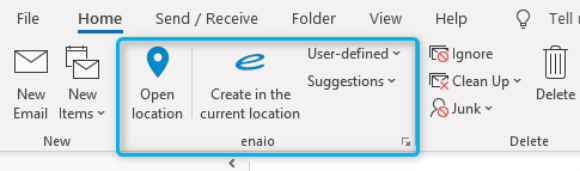
enaio® Outlook Add-In NG provides functions that make it easier for you to transfer elements (for example, e-mails or appointment requests/cancellations) from the classic version of Outlook to enaio®.
The functions are integrated into the Start and Message ribbon tabs in the classic version of Microsoft Outlook via an add-in. You can find information on how to add an add-in in the classic version of Outlook in Microsoft’s product help (see Microsoft support ).
The Create in the current location, User-defined, and Suggestions filing functions are available when selecting e-mail items in the Microsoft Outlook inbox as well as when sending and forwarding them. It is not possible to file e-mails or their attachments in the enaio® client filing tray and in the internal tray of enaio® webclient as a desktop application.
If enaio® client and enaio® webclient as a desktop application are installed on the same computer, the client you want to use can be set via the settings of the add-in (see Client selection).
 on the right.
 areas. Use the toolbar to show all hidden areas at once:
