Kerberos Authentication
Login names can be managed in enaio® on the basis of the UPN ('user principal name': for example, 'name@mydomain.com') or the SAM user name ('security accounts manager': for example, 'name'). In both cases, user authentication can be carried out using Kerberos in enaio® via Windows.
From a technical standpoint, Kerberos always requires the UPN as the authentication mechanism, whereas NTLM always requires the SAM.
Kerberos authentication requires configurations in enaio® enterprise-manager and enaio® gateway.
Configurations in enaio® enterprise-manager
The identification of the user to be logged in is configured for Kerberos in enaio® enterprise-manager via the Login/name resolution (Kerberos) parameter. If this parameter is set to UPN, then all enaio® login names must comply with the UPN form. If this parameter is set to SAM, the SAM needs to be used for all users. The corresponding registry key is called QueryNamesMethod in the server registry and it has the values 0/1 (SAM/UPN).
If Kerberos is configured correctly for Windows, the other settings are made in the configuration of enaio® server in enaio® enterprise-manager.
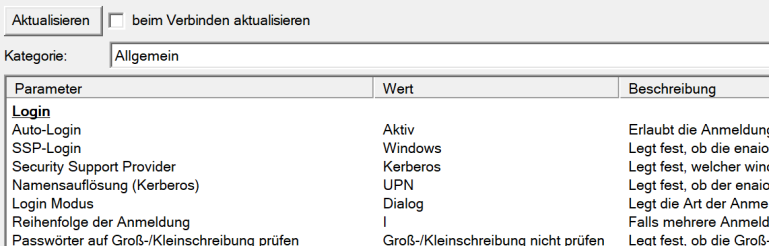
Here, Auto login is set to Active and SSP login is set to Windows so that the authentication of the client applications for enaio® server is carried out via Windows and the server-internal parameter Login order is not used. The security support provider is set to Kerberos and the name resolution (Kerberos) needs to be selected according to the login names of the users in the system.
| Parameter | Value | Value in the server registry |
|---|---|---|
| Auto login | Active | Schema/Login/Auto login : 1 |
| SSP login | Windows | Schema/Login/NTLM login : 1 |
| Name resolution (Kerberos) | UPN | Schema/Login/QueryNamesMethod : 1 |
| Security Support Provider | Kerberos | Schema/Login/Support provider : Kerberos |
asinit.cfg
For enaio® client, the administrative components, and enaio® capture, the FQDN of enaio® server with port must be specified in the asinit.cfg configuration files for the connection configuration to enaio® server. Example:
[ARCHIV]
Comstring=myserver.mydomain.com#4000
enaio® enterprise-manager continues to use the Windows-based login, which means that a login exception needs to be defined for this application.
If enaio® client and enaio® gateway are installed on the same computer and Kerberos authentication is enabled, then enaio® client cannot start because authentication via enaio® client is not possible.
Kerberos Requirements
The user account for the enaio® server service needs to be a domain account for Kerberos authentication. A local system user account that is normally used is not suitable. The domain account must be granted sufficient rights to run the service. In addition, a suitable SPN (service principal name) needs to be assigned for this user account in the domain.
Example: enaio/myserver.testdomain.org:4000 myserver
myserver.testdomain.org is the computer on which enaio® server is installed. You need to have entered the fully qualified name (FQDN), including port, here.
Domain Configuration
The following steps are necessary:
-
Register SPN in the domain.
-
Submit the following call in an administrative shell, for example:
setspn -A HTTP/enaio.testdomain.org enaioadmin
-
Export the registered SPN to a keytab file. Example:
ktpass /out c:\enaioadmin.keytab /mapuser enaioadmin@TESTDOMAIN.ORG /princ HTTP/enaio.testdomain.org@TESTDOMAIN.ORG /ptype KRB5_NT_PRINCIPAL /crypto All /pass enaioadmin_password- The file does not necessarily have to be on the C: drive and can be assigned any name.
- The password transferred at the end must correspond to that of the specified NT account (enaioadmin).
-
enaio® gateway must be running with the user account as the service for which the SPN was set.
-
The address of enaio® gateway must be entered in the internet properties under local intranet.
Configuring enaio® gateway
In the …\os_gateway\config\application-prod.yml microservices configuration file of enaio® gateway, add the following block to the login procedures in the ossecurity section: Example:
ossecurity:
  kerberos: {
    enabled: true,
    servicePrincipal: 'HTTP/beispiel.testdomain.org@TESTDOMAIN.ORG',
     keytabLocation: 'c:/enaioadmin.keytab'
  }
servicePrincipal must conform to the format shown in the example. The log must be specified as HTTP and not as HTTPS, even if enaio® gateway is configured for SSL.
keytabLocation is the path to the exported keytab file; slashes (/) must be used as the path separator.
enabled: (true/false) defines whether Kerberos authentication is active. If Kerberos authentication is active then the other login methods – Session GUID, Simple, Form-based, NTLM, Basic – are ignored.
It may be necessary to configure the HTTP header length limit.
 on the right.
 areas. Use the toolbar to show all hidden areas at once:
