The Configuration File 'asinit.cfg'
The configuration file asinit.cfg contains the connection data for the enaio® server. During installation of enaio® client, the administrative components and enaio® capture are installed in each client directory. The file consists of individual sections enclosed in brackets and pairs of parameters/values within the sections. Asinit.cfg can be changed before installation or installed with the connection data using the command line parameter:
-
The 'SERVER#PORT' placeholder can be replaced by the connection data in the enclosed configuration file. The configuration file may contain other optional parameters. It is then installed as edited.
- If no changes are made, localhost#4000 is entered in the installed configuration file. The server and port must be added.
The asinit.cfg configuration file can be edited for connections to servers from server groups and for a selection of connections, for example, to test or production systems.
The client cache directory for temporary data can also be entered.
An example of a configuration file for connecting to a server:
| [ARCHIV] |
|
| COMSTRING=<sever>#<port> |
Computer name or IP address of the computer on which the enaio® server is installed and the port; and the cluster address in the event of clusters. For Kerberos authentications, enter the fully qualified name (FQDN) with port. |
| COMMODULE=axavapps.dll |
Preset entry for all configurations |
| [REGISTRATION] |
Section for modules to register when starting |
| MODULE0=oxvbscript.dll MODULE1=axaddxmltree.dll MODULE2= … |
The modules are entered automatically according to the installation options. If no registration is necessary when starting, then the following can be entered in the [Archive] section: NOREGISTER=1 |
Optionally the [CLIENT] section can be added with the following entries:
| [CLIENT] | |
| OSTEMP= |
The 'OSTEMP' cache directory for temporary data. The default directory is: %LOCALAPPDATA%\Temp\OSTEMP You can enter a different directory. |
| MAXREQUESTTHREADS=value |
Number of threads or database connections. Values should only be entered when authorized by the support or consulting team. Entries apply to enaio® client only. |
| MAXPOOLEDDBCONNECTIONS=value |
Example of a configuration file for connecting to different enaio® systems via a selection dialog when the client is started:
| [ARCHIV] |
|
| COMSTRING=<server>#<port> |
Default server for the selection dialog |
| [SERVER] |
Section for the available servers. The section name [SERVER] is specified in this scenario. |
|
Sequentially numbered list of servers available for selection. A label, which is also shown in the selection dialog, can be attached. No connection probabilities can be used for the individual servers in this section.
|
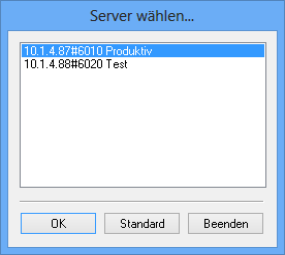
Example of a configuration file for connecting to a server from a server group:
| [ARCHIV] |
|
|
COMSTRING=GRUPPE |
Entry of any group name. The corresponding section may not be named 'SERVER.' |
|
[GRUPPE] |
Section for the servers available within an enaio® server group. |
|
Sequentially numbered list of servers in an enaio® server group with connection probability as a percentage. |
Example of a configuration file for connecting to one of multiple server groups using a selection dialog:
| [ARCHIV] |
|
|
COMSTRING=GROUP_A |
Default server group for the selection dialog. |
| [SERVER] |
Section for the available server groups. |
|
SERVER0=GRUPPE_A SERVER1=GRUPPE_B |
Sequentially numbered list of enaio® server groups. A section is created for each server group. |
|
[GRUPPE_A] |
|
|
Sequentially numbered list of servers in an enaio® server group with connection probability as a percentage. |
|
[GRUPPE_B] |
|
|
Sequentially numbered list of servers in an enaio® server group with connection probability as a percentage. |
 on the right.
 areas. Use the toolbar to show all hidden areas at once:
