You can subscribe to documents, registers, and folders. Subscribed objects will be listed in the inbox area if the data they contain has been edited. When subscribing, you can choose for which types of changes you will receive a notification.
You can also subscribe to queries. If an archive object that matches your query criteria was created, or when an archive object has been edited and therefore matches these criteria, this object will be listed in the inbox area.
You can manage your inboxes for subscriptions in the Settings dialog.
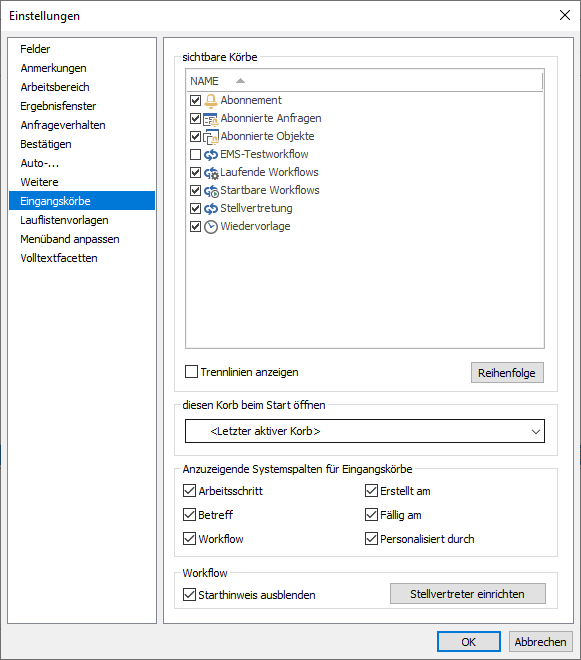
Inboxes for the configurations of subscribed queries and objects can be shown/hidden in the Visible inboxes area. Subscription notifications are shown in the main inbox My incoming messages or in the Subscription inbox if you activate this inbox in the Inbox area.
Subscriber List
In the properties dialog of an object, a list of all users and groups which have subscribed to the object can be opened. You can access the  Properties function via the context menu or the ribbon.
Managing Subscriptions
Users with the system role (39) Client: Manage subscriptions can set up and manage subscriptions for other users and groups. You can access other users’ subscriptions through your subscription baskets and open a subscriber list from an object’s properties.
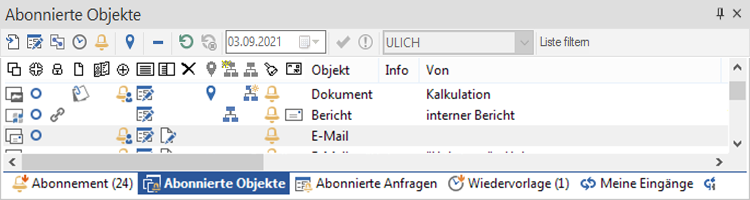
You will see a user list on the toolbar of the subscription inbox; with this list, you can open the subscription inboxes of other users.
Users with the system role (92) Client: Subscriptions for others can also set up subscriptions for other users. However, you do not have permission to delete these subscriptions.
Access rights and system roles are assigned by your administrator.
 on the right.
 areas. Use the toolbar to show all hidden areas at once:
