Folders, registers, and documents which you delete are moved to your recycle bin.
You can open the recycle bin via View ribbon tab > Areas >  Recycle bin.
To access the recycle bin, you need the system role (33) Client: Show personal recycle bin. Access rights and system roles are assigned by your administrator.
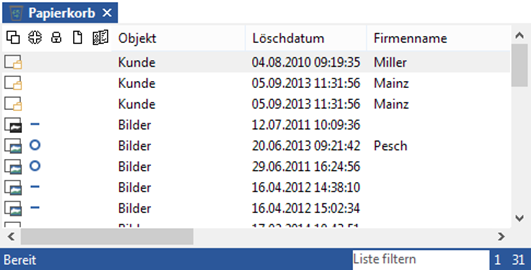
If you have opened the recycle bin, the following functions are available via the Recycle bin ribbon tab:
 Open ribbon group
| Icon | Comment |
|---|---|
|
|
Open location You open the original location of the selected object. |
|
|
View index data Opens the read-only index data of the marked object. |
|
|
History Opens the history of the marked object. |
|
|
Properties Opens the features of the marked object. |


 Recycle bin ribbon group
| Icon | Comment |
|---|---|
|
|
Delete Permanently deletes all objects from the recycle bin. |
|
|
Refresh Updates the display after changes have been made. |
|
|
Cancel Cancels the update. The folders that were found up to that point are shown. |
|
|
Users with the system role (37) Client: Show system recycle bin can access a user list on the Recycle bin ribbon tab, which allows them to open another user’s recycle bin. Objects from other users’ recycle bins can also be restored and deleted using the system role (40) Client: Delete objects from recycle bin. Select the user whose recycle bin you want to view. |


 Object ribbon group
| Icon | Comment |
|---|---|
|
|
Restore The object will be inserted at the original location. Folders and registers can only be individually recovered. You will be notified if objects cannot be recovered. Documents whose filing location no longer exist will be placed in the filing tray. |
|
|
Delete permanently To delete items from the recycle bin, you need the system role (40) Client: Delete objects from recycle bin. Access rights and system roles are assigned by your administrator. An object that was deleted from the recycle bin will be permanently deleted. You will always be shown a security confirmation dialog. Folders and registers can only be deleted along with their entire content. You will receive the corresponding security information. |


Restoring objects can lead to inconsistencies in the archiving system, for example, if new objects contain the same index data in key fields as a deleted object. If this is the case, you will be shown the corresponding message.
Documents from variant administration will be placed in the filing tray individually. Variant administration cannot be restored.
 on the right.
 areas. Use the toolbar to show all hidden areas at once:
