The ribbon contains the ribbon tabs. You can open these by clicking the tab headers or by using the keyboard shortcut Alt + Letter. If you hold down the Alt key a little longer, the available keyboard shortcuts will be displayed.
The ribbon tabs and their entries change to fit the task at hand. If, for example, you have opened a hit list, the ribbon will contain the Hit ribbon tab. The entries then match the ones in the context menu of the hit list.
The ENAIO ribbon tab is always shown in the ribbon; the Start ribbon tab and View are shown on start-up by default. Ribbon tabs can be customized by users with the appropriate system role through the settings (see 'Customize ribbon' area ).
 ENAIO ribbon tab
| Ribbon group | Description |
|---|---|
| Print document |
Opens a selection dialog which provides the following options:
|
| Log out | You can log out without closing enaio® client, |
| Change password… | You can change your password. |
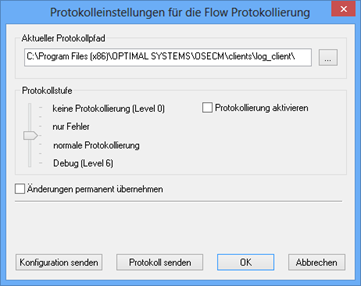
| Logging |
You can change the logging level for the duration of a session. In the event of an error, it enables you to instantly send the relevant information to the administrator.
The Send configuration button is used to send the current log configuration by e-mail. When transferring logs, all log files for the current day and the configuration file will be send as a ZIP file. Users with the system role (02) Administrator: Configure entire system can permanently apply the change to the log level. Access rights and system roles are assigned by your administrator. |
| Information | Information about enaio® client and the workstation are displayed. |
| Help | You can open online help, full-text help, and keyboard shortcut help. |
| Settings | Opens the 'Settings' dialog (see The Settings Menu ). |
| Presence | You can change your presence status (see Absence and Substitution), set up a substitute, and view for whom you are covering. |
| Exit | Select Exit to close enaio® client. |
The only keyboard controls available to navigate this ribbon tab are the tab or arrow keys.
Start ribbon tab
| Ribbon group | Description | ||||||||
|---|---|---|---|---|---|---|---|---|---|
| New | Choose a folder type to create a new folder via its index data form or add a new portfolio. | ||||||||
| Search |
Open the search form for the following queries:
|
||||||||
| Objects |
|
||||||||
| Start application | Here you will find all integrated external applications. |


 View ribbon tab
| Ribbon group | Description | ||||||||||||||
|---|---|---|---|---|---|---|---|---|---|---|---|---|---|---|---|
| Tabs | You can define whether the active windows will be displayed as cascading windows or as tiles, switch between windows, and close windows. | ||||||||||||||
| Preview | You can open the content preview and details preview in this group. | ||||||||||||||
| Areas |
Open the following areas via the Areas group:
The administrator can add additional dashlets (see Dashlets). |


 on the right.
 areas. Use the toolbar to show all hidden areas at once:
