enaio® services
enaio® services are configured via enaio® services-admin or the YML files of the services.
You can access enaio® services-admin in your browser via this URL:
<gateway-IP>:<Port>/sma
Default port: 7273
The configuration files for the services are located in the \config\ directory of enaio® service-manager.
When installing enaio® service-manager, the connection data to enaio® server and the technical user are entered using the password. This data is then entered in the configuration files for services.
In order to enable access to data in enaio® services-admin, the browser cache must be deleted after updating enaio® service-manager so that the current data is shown.
enaio® services-admin
When enaio® services-admin is started, it shows all enaio® service-manager services and their state. If multiple instances of a service are included, they are grouped together.
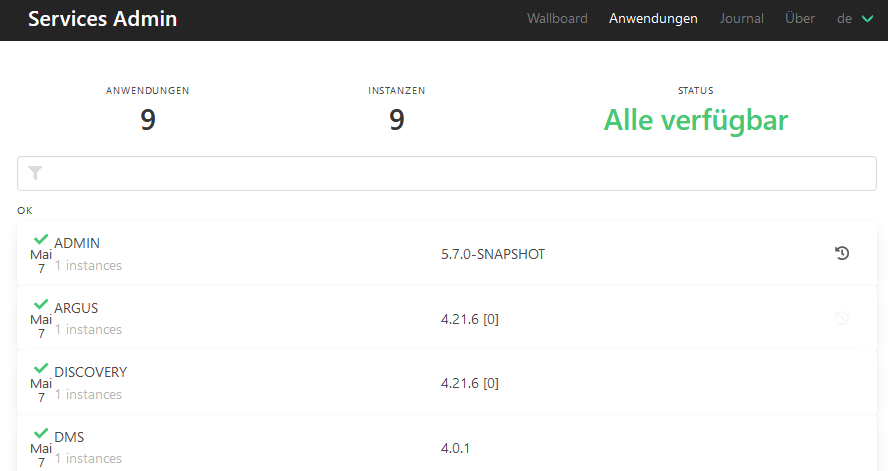
If you click a service, a line is shown where you can use to restart the service. Clicking in this line opens the details page of the service. This contains service-specific links in the header such as links to the Swagger GUI with the API documentation.
| UP | The service is activated. |
| DOWN |
The service is running, but not activated. One reason could be issues with the connection. The service attempts to automatically activate itself. |
| OFFLINE |
The service is not running. The 'argus' service regularly attempts to start the service. |
| UNKNOWN | Unknown status |
Services such as the EMS service 'mailstorage', which are changed directly via the configuration file, need to then be restarted using the Reload button. Services that are configured via enaio® services-admin are automatically restarted once the changes are saved.
Service Information
Information on a chosen service is accessed via the menu on the left on the details page.
| Details | Detailed information on the service, status information on connected components. |
| Metrics | Statistics on the number of key events. |
| Environment | Information on profiles and configuration parameters. |
| Configuration |
Configuration data for services. |
| Logger | Log level for packages of the service. |
| Thread dump |
Create and download memory image. |
| Head dump | Create and download memory image. |
Configuration Data of the Services
enaio® services-admin usually masks sensitive information from service configuration files, such as passwords. The masked data cannot be edited.
Further data, which will then also be shown masked in enaio® services-admin, can be specified via the configuration files located in the \config\ directory of enaio® service-manager:
management.endpoint.additionalKeysToSanitize: "key-to-sanitize, another-key-to-sanitize"
 on the right.
 areas. Use the toolbar to show all hidden areas at once:
